
Fantasy Gems Download: Fantasy Game APK for Android (2026)
Many people search for a Fantasy Gems download or a Fantasy Game download on the Play Store and can’t find it. This Fantasy Gems download guide explains why, how the Fantasy Gems APK download works on Android, how to get the latest version, and how to check that an APK file is safe before installing it.
Quick answer
Fantasy Gems (Fantasy Game) is not available on the Google Play Store. It is installed as an APK file on Android: allow “Install unknown apps” for your browser, download the APK, scan it with Google Play Protect, then tap Install. There is no official iPhone app.
Fantasy Gems APK: Key Details
| Detail | Information |
|---|---|
| App name | Fantasy Gems (Fantasy Game) |
| File type | APK (Android) |
| Google Play Store | Not available |
| iPhone / iOS | No official app; web version only |
| Android requirement | Usually Android 5.0 or higher |
| Price | Free to download |
| Verified developer | None |
Is Fantasy Game Available on the Play Store?
No. Searches for “Fantasy Game download Play Store” will not find an official listing. Google Play does not allow real-money betting apps in Pakistan, so apps like Fantasy Gems are distributed as APK files through websites and shared links.
If you see an app on the Play Store using the name “Fantasy Gems” or “Fantasy Game,” it is likely an unrelated game, such as a match-3 puzzle, and not the same app.
Fantasy Gems Download: How to Install the APK on Android
- Open your phone’s Settings.
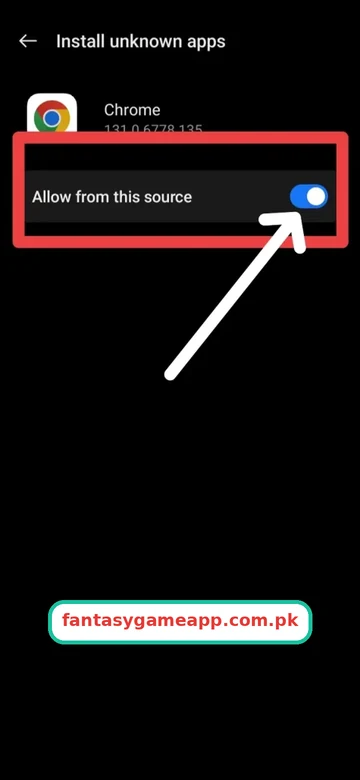
- Go to Apps (or Security) and find Install unknown apps.
- Allow your browser (for example, Chrome) to install unknown apps.
- Download the Fantasy Gems APK file.
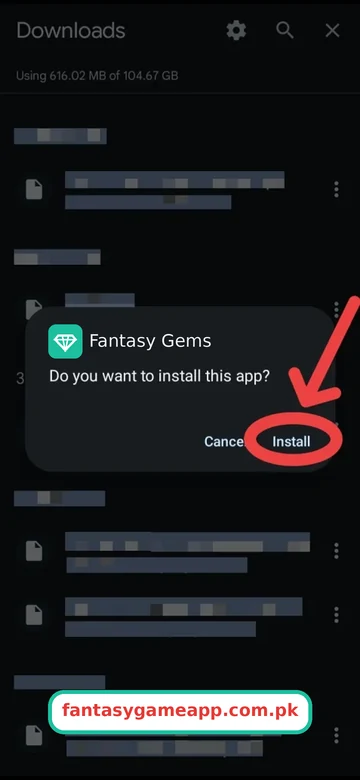
- Open the downloaded file from your notifications or Downloads folder.
- Tap Install and wait for it to finish.
- Open the app and register your Fantasy Gems account or log in.
Turn “Install unknown apps” off again for your browser. This protects your phone from accidental installs later.
Fantasy Game Download for Android: Requirements
| Requirement | Details |
|---|---|
| Android version | 5.0 or higher (most phones qualify) |
| Free storage | Around 50–100 MB recommended |
| Internet | Needed for download and gameplay |
| Permissions | Check requested permissions before installing |
How to Check an APK Is Safe Before Installing
Since the Fantasy Gems APK isn’t reviewed by Google Play, checking it yourself matters (also read is Fantasy Gems real or fake):
Scan with Play Protect
Open the Play Store, tap your profile icon, choose Play Protect, then tap Scan.
Upload to VirusTotal
Visit virustotal.com and upload the APK to check it with many antivirus engines at once.
Check permissions
A game should not need access to your SMS, contacts, or call logs. If it asks, don’t install it.
Check the file size
A tiny file (a few KB) or an unusually large one can mean it’s fake or modified.
Avoid “MOD” or “VIP unlocked” versions
These are modified files and are a common way malware spreads. Read why every Fantasy Gems hack is fake.
Fantasy Game Download APK Latest Version: How to Update
- Open the app. Many versions show an update prompt automatically.
- If there is no prompt, download the newest APK from the same source you used before.
- Install it over the old version. Your account stays linked to your mobile number, so you won’t lose it.
- If installation fails, uninstall the old version first, then install the new one and log in again.
When the app’s link or domain changes, fake “latest version” files often appear in WhatsApp and Telegram groups. Be extra careful during updates.
Can I Download Fantasy Gems on iPhone or PC?
iPhone
There is no official iOS app. iPhone users can only use the web version in Safari. Follow our Fantasy Gems iOS guide to add it to the Home Screen.
PC
You can use the web version in a browser, or install the APK through an Android emulator such as BlueStacks. See the full Fantasy Gems for PC steps.
Fantastic Game Download: Is It the Same App?
Yes. “Fantastic game download” is a common misspelling of Fantasy Game download. The steps above apply. For the full name explanation, login steps and fake apps to avoid, read our Fantastic Game guide.
Fantasy Gems Download Problems and Solutions
| Problem | Solution |
|---|---|
| “App not installed” | Uninstall the old version, free up storage, then retry |
| “There was a problem parsing the package” | The file is incomplete or corrupt. Download it again |
| Install blocked | Allow “Install unknown apps” for your browser |
| Play Protect warning | Take it seriously. Scan the file before continuing |
| App crashes after install | Clear cache, restart the phone, or reinstall |
Before Your Fantasy Gems Download
Downloading the app is free, but using it for real money carries risk. Fantasy Gems has no verified developer or licence, is not reviewed by Google Play, and online betting is not permitted in Pakistan. Read our Fantasy Gems guide, the Fantasy Gems deposit rules and the withdrawal guide before depositing anything.
FAQs
How do I download Fantasy Gems?
Allow “Install unknown apps” for your browser, download the APK, scan it, and tap Install.
Can I download Fantasy Game from the Play Store?
No, it is not available on the Google Play Store.
Is Fantasy Gems APK download free?
Yes, downloading the app is free.
Is there a Fantasy Gems app for iPhone?
No official iOS app exists. iPhone users can use the web version.
How do I get the latest version of the Fantasy Game APK?
Accept the in-app update prompt, or install the newest APK over the old version from the same source.
Is the Fantasy Gems APK safe?
It isn’t reviewed by Google, so always scan it with Play Protect or VirusTotal and check its permissions before installing.